Monday, November 9, 2026 · 8:10 · Hosted by Alex and Jordan
Listen to this episode on Spotify: https://open.spotify.com/episode/2j2QOO4XkT2tdztB5L9vnM
Listen and follow
Listen and follow: Spotify (https://open.spotify.com/episode/2j2QOO4XkT2tdztB5L9vnM), Apple Podcasts (https://podcasts.apple.com/us/podcast/id1383868946), YouTube (https://youtu.be/dMJ0qTYcY9s), Podcast page (https://webguynick.com/podcast/).
About this episode
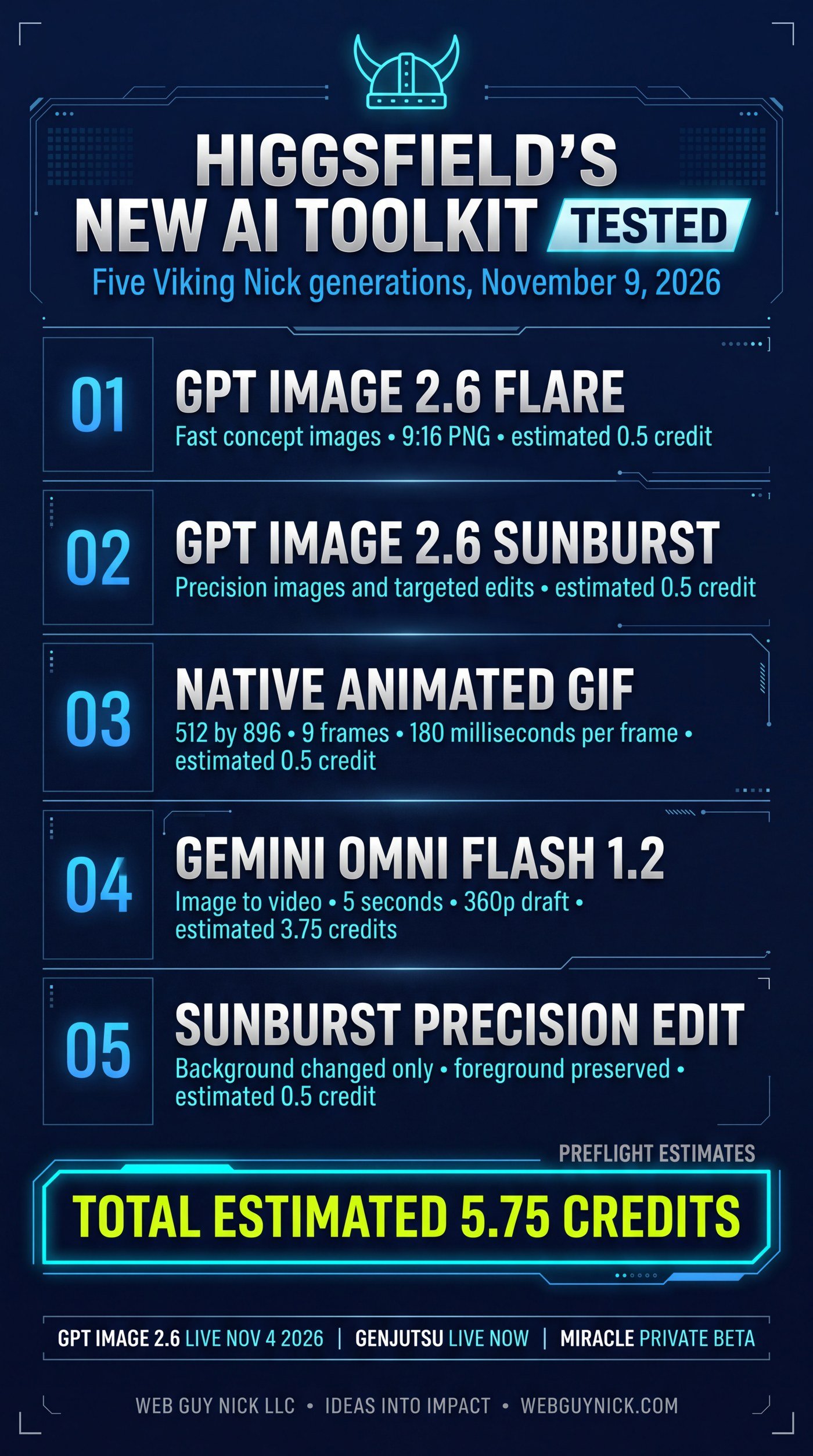
A hands-on episode, not a press release recap. Higgsfield shipped a new generation and editing stack, so we ran it against the hardest test assets we own: the approved Viking Nick character reference and the official Web Guy Nick logo. Five generations completed in one session for an estimated 5.75 credits total: a GPT Image 2.6 Flare concept image, a GPT Image 2.6 Sunburst precision variant, a native animated GIF generated by the image model itself, a five-second Gemini Omni Flash 1.2 video built from a single still, and a Sunburst precision edit restricted to the background only. Alex and Jordan walk through what each tool does, what it could mean for a small business, and the human quality checks that still stand between a finished generation and client-ready work. The episode also draws the availability line clearly: Genjutsu video editing is publicly available today, while Miracle, Higgsfield’s layer-based editor announced November 6, is still in private beta with no published price or release date.
Key takeaways
- Flare explores, Sunburst refines. GPT Image 2.6 Flare is the speed version for fast concept rounds. Sunburst is tuned for finer detail and more consistent edits, especially when faces, products, and text must survive from one version to the next.
- GIFs are now a native output. The image model builds animated GIFs directly (our test: 512x896, nine frames, 180 milliseconds per frame). Short loops are a practical accent for landing pages and social posts, with file weight and reduced-motion settings as the two cautions.
- A still can become video. Gemini Omni Flash 1.2 turned our Flare image into a five-second clip from a single start frame. Our run was a 360p draft tier test of the pipeline, not a delivery master, and its outputs carry a SynthID watermark identifying them as AI-generated.
- The limitation is the feature. The precision edit asked Sunburst to change only the background. Targeted editing, where untouched parts stay untouched, is what turns AI images into a production tool.
- Availability is the story nobody posts. Genjutsu (Motion Transfer and Object Swap for existing video) is live now. Miracle is private beta only. Plan around the first and watch the second.
- Estimates are not invoices. All five credit figures in this episode are Higgsfield preflight estimates for our account and settings, 5.75 credits in total, not a verified final billing reconciliation.
- Completion is not approval. Side-by-side quality review of the test outputs (facial similarity, logo geometry, exact lettering) is still pending, and we do not call an output client-ready until a human passes it.
One thing to try this week: Take one photo your business already owns, a product shot or your storefront, and run one targeted edit that changes only the background. If the untouched parts stay untouched, you have a new production tool. If they do not, you learned it cheaply, before it mattered.
In this episode
- [0:00] Cold Open: We Ran the Tools Ourselves
- [0:47] GPT Image 2.6, Flare and Sunburst
- [2:27] Native Animated GIFs
- [3:27] Gemini Omni Flash 1.2, Image to Video
- [4:36] The Precision Edit
- [5:21] Genjutsu Today, Miracle Tomorrow
- [6:36] What This Means for a Small Business
- [7:30] One Thing to Try This Week
Pull quotes
- “The AI does the volume. The humans keep the brand honest.” — Jordan
- “You cannot use it today, we cannot use it today, and any agency that offers it to you as a current service is selling you a demo video.” — Jordan, on Miracle
- “Motion is a garnish, not the meal.” — Alex, on animated GIFs
- “The limitation you ask for is as important as the change.” — Jordan, on precision edits
The deep dive
Why we tested on Viking Nick
Press demos use assets chosen to flatter the model. We used the opposite: a recurring character whose face has to match an approved reference, armor with fine detail, and our own logo, whose geometry and lettering either survive or visibly do not. If a workflow holds up on Viking Nick, it has a chance on real client work. The full test, with every output and setting, is published here: https://webguynick.com/higgsfield-new-ai-features-viking-nick-gpt-image-2-6-gemini-test/
The five tests at a glance
| Test | Tool | Output | Estimated cost |
|---|---|---|---|
| Concept image | GPT Image 2.6 Flare | 9:16 PNG, medium quality, 1K | 0.5 credit |
| Precision variant | GPT Image 2.6 Sunburst | 9:16 PNG, medium quality, 1K | 0.5 credit |
| Animated GIF | GPT Image 2.6 Flare (GIF mode) | 512x896, 9 frames, 180 ms per frame | 0.5 credit |
| Image to video | Gemini Omni Flash 1.2 | 5 seconds, 9:16, 360p draft tier | 3.75 credits |
| Precision edit | GPT Image 2.6 Sunburst | Background-only change to the Flare image | 0.5 credit |
Total estimated generation cost: 5.75 credits. These are Higgsfield preflight estimates for this account and configuration, not a verified final billing reconciliation or a universal price. All five jobs reached completed status. Completed status is not a quality pass: side-by-side review of likeness, logo geometry, and lettering is still pending, and the test article will be updated when it is done.
Flare and Sunburst: two speeds of the same model
GPT Image 2.6 is OpenAI’s image model family, released November 4, 2026, and Higgsfield offers it in two versions. Flare is built for speed: OpenAI describes generation at lower quality settings running up to about 50 percent faster than the previous generation, with some images produced in as little as six seconds. Those are vendor figures, not our measurements, but the working pattern they enable is real: generate many directions cheaply, then spend review time on the best two or three. Sunburst trades speed for control. It is the version Higgsfield points to for detailed edits and compositions where faces, product details, and text need closer attention. Our test ran the identical brief and references through both, which is the only honest way to compare them, and the comparison itself is part of the pending QA pass.
For a small business, the pairing matters more than either model alone. Concept rounds stop being a bottleneck: a roofer can see five ad directions before choosing, a med spa can compare seasonal looks without a photo shoot for each, and the chosen direction goes to Sunburst for careful revision instead of starting over.
Native animated GIFs: the small feature with real uses
GPT Image 2.6 also generates animated GIFs natively, along with PNG stills and SVG vectors in preview. The model builds the frames itself; there is no video to convert and no sprite sheet to assemble by hand. Our GIF ran 512x896 at nine frames and 180 milliseconds per frame, roughly a 1.6-second loop, and the hosted file weighs about 1.5 megabytes.
The business uses are unglamorous and useful: a looping product accent on a landing page, a mascot gesture in a social post, a subtle animated detail in an email or an ad. GIFs play almost everywhere with no player chrome. The cautions are equally practical: watch total page weight on production pages, and respect reduced-motion accessibility settings. A GIF should earn its place.
Gemini Omni Flash 1.2: a still becomes a scene
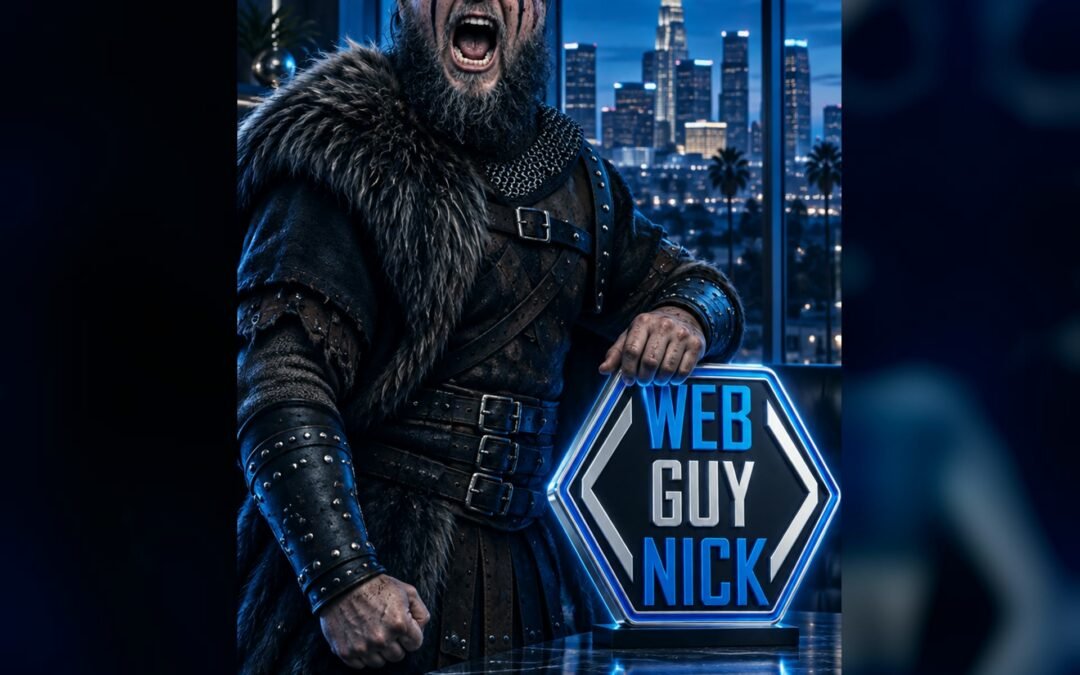
Gemini Omni Flash is Google DeepMind’s video generation and editing model, available inside Higgsfield. It accepts image, text, video, and audio inputs, and it can build motion from a pinned opening frame. We fed it the finished Flare image and asked for subtle camera movement and shifting office light, with the character and the brand plaque held consistent. The output was a five-second vertical clip at 360p, an estimated 3.75 credits.
Read that result correctly: 360p is a draft tier. The point of the test was the pipeline question, whether an approved still concept can become moving video without restarting the creative process. It can. Any client use would rerun at delivery resolution, followed by a frame-by-frame review for character drift, logo distortion, camera continuity, and text legibility. One more detail worth knowing: outputs from this model family carry a SynthID watermark, an invisible marker identifying the video as AI-generated. For businesses that sell on trust, built-in labeling is a feature.
The precision edit: change one thing, keep the rest
The fifth test gave Sunburst the Flare image and a single instruction: replace only the office-window background with a darker blue-hour Los Angeles skyline, and leave the foreground alone. The job completed at an estimated half credit. Whether every foreground detail survived unchanged is part of the pending visual inspection, and that inspection is the point. Every business owner knows the failure mode this feature promises to fix: you ask for one small change and the whole image comes back different. If targeted editing holds the untouched parts steady, AI image work stops being a slot machine and becomes a revision tool, closer to asking a designer for a change than to re-rolling a prompt.
Genjutsu is live today
Genjutsu is Higgsfield’s video-to-video editing tool, and unlike the private-beta technology below, it is publicly available now. It has two modes. Motion Transfer keeps a clip’s movement, timing, and camera work and rebuilds the scene around them. Object Swap changes one element, a person, a product, an outfit, a prop, and preserves the rest of the shot. Genjutsu Lite, a faster and cheaper version, launched on October 20, 2026. The business cases are immediate: a testimonial video with last year’s truck branding in the background, a product demo featuring an item you no longer sell, a great clip with one wrong detail. Fix the element, keep the footage.
Miracle is not available, and that is the headline
Higgsfield announced Miracle on November 6, 2026. As demonstrated, it splits a video into layers so a single object can be recolored, moved, or relit while the clip plays, without regenerating the whole frame. It is genuinely impressive technology. It is also, as of this episode, in private beta with select testers. Higgsfield has published no price, no release date, and no file limits, and says it is coming to Higgsfield MCP. Nobody outside the beta can use it, including us. We include it here because your feed will show you the demos without the access status. When Miracle opens, we will run it through the same kind of test as everything above and report what it actually does on real footage.
What this means for a small business
The opportunity is not more AI pictures. It is a pipeline: brand reference, draft concept, precise revision, short animation or video, human quality review. That pipeline compresses the expensive part of creative production, which is iteration. More concepts per brief, more review rounds before a deadline, and faster decisions, with people spending their time judging rather than assembling. The tax is consistency. Logos drift, faces drift, lettering bends. The professional workflow keeps humans as the gate: approved references in, generations out, original logo files composited for final delivery, and every output checked before it ships.
Sources
- Our hands-on test (November 9, 2026): https://webguynick.com/higgsfield-new-ai-features-viking-nick-gpt-image-2-6-gemini-test/
- Higgsfield, GPT Image 2.6 on Higgsfield (published November 4, 2026): https://higgsfield.ai/blog/gpt-image-2-6-higgsfield
- Higgsfield, Gemini Omni Flash model page: https://higgsfield.ai/gemini-omni-flash
- Higgsfield, Meet Higgsfield Genjutsu: https://higgsfield.ai/blog/higgsfield-genjutsu
- Higgsfield Miracle announcement coverage (private beta, announced November 6, 2026): https://www.wireflow.ai/blog/higgsfield-miracle and https://www.adgraam.com/blog/higgsfield-miracle-features-private-beta-access
More episodes
- Bonus: The AI Apps You Are Not Watching Yet: https://webguynick.com/the-ai-apps-you-are-not-watching-yet/
- GPT Image 2.6 Deep Dive: GIFs, Reference Characters, and the Price Catch Nobody Read: https://webguynick.com/gpt-image-2-6-deep-dive-gifs-reference-characters-price-catch/
- Related reading, the original hands-on test: https://webguynick.com/higgsfield-new-ai-features-viking-nick-gpt-image-2-6-gemini-test/
Read the full transcript
Alex: Quick disclosure before we start: you are listening to an AI-produced podcast. Our voices are synthetic, the research is real, and every claim in this episode is sourced in the show notes.
Jordan: Welcome back to the Web Guy Nick Podcast. I am Jordan.
Alex: And I am Alex. Today we are doing something we love on this show: instead of reading you a press release, we ran the tools ourselves. Higgsfield just shipped a batch of new AI generation and editing features, so we pointed them at the toughest test subject we have: Viking Nick, our own recurring AI spokesperson, plus the official Web Guy Nick logo. Five generations, one afternoon, and a total estimated cost under six credits.
Jordan: And we are going to tell you what actually happened, including the parts that still need a human review before any client ever sees them.
Alex: Start with the headline release. GPT Image 2.6 is OpenAI’s newest image model family. It launched on November 4, and Higgsfield has it in two flavors. Flare is the speed version. OpenAI says generation at lower quality settings runs up to about 50 percent faster than the last generation, with some images landing in as little as six seconds. That six-second figure is OpenAI’s claim, not our stopwatch, but the idea is simple: Flare is for exploring. Ten concepts before lunch, pick a direction, move on.
Jordan: And Sunburst is the careful one. Same model family, tuned for finer detail and more consistent edits, especially when faces, product details, and text have to survive from one version to the next. Our test ran the exact same Viking Nick brief through both. Same executive office over Los Angeles at blue hour, same character reference, same logo. Both jobs completed at an estimated half a credit each, at medium quality and 1K resolution.
Alex: Here is the honest part. Both images exist. Both finished. But we have not finished the side-by-side quality review yet: how close is the face to our approved Viking Nick reference, is the logo geometry right, is the lettering exact? On this show we do not call an output client-ready until a human checks those things, and that check is still on the list.
Jordan: For a small business, though, the workflow is the story. Flare for fast concept rounds when a client needs to see directions, Sunburst when the chosen direction needs careful revision. That used to be a designer afternoon. Now it is a review meeting with options already on the table.
Alex: Segment two is my favorite, because it sounds small and it is not. GPT Image 2.6 can now generate animated GIFs natively. Not a video you convert, not stills you stitch together yourself. You ask for a GIF and it builds the frames.
Jordan: Our Viking Nick GIF came out at 512 by 896, nine frames, 180 milliseconds per frame, so about a 1.6-second loop, for an estimated half credit. The hosted file is roughly 1.5 megabytes.
Alex: Why should a business owner care about a GIF in 2026? Because motion stops thumbs. A looping product accent on a landing page, a mascot waving in a social post, a subtle animated touch in an ad. Short loop, no video player, works almost everywhere. Two cautions from our own test notes: watch file weight on production pages, and respect reduced-motion settings for accessibility. Motion is a garnish, not the meal.
Jordan: Next, we took the finished Flare image and handed it to Gemini Omni Flash 1.2. That is Google DeepMind’s video model, running inside Higgsfield. We used it as an image-to-video tool: the still became the opening frame, and the prompt asked for subtle camera movement and shifting office light while the character and the brand plaque stayed consistent.
Alex: The result: a five-second vertical clip at 360p, estimated at 3.75 credits. Now, 360p is a draft tier. Nobody is delivering that as a finished client master, and we say so in the article. But as a pipeline test it matters, because the question it answers is the expensive one: can a still concept become moving video without starting over? The answer is yes, the path works. Before client use we would rerun at delivery resolution and review for character drift, logo distortion, and text legibility, frame by frame.
Jordan: One more detail worth knowing: outputs from this model family carry a SynthID watermark, an invisible marker that identifies the video as AI-generated. For businesses building trust with customers, that kind of built-in labeling is a feature, not a bug.
Alex: Test five might be the most practical of the set. We gave Sunburst the original Flare image and one instruction: change only the office background. Darker blue-hour Los Angeles skyline through the windows. Leave the foreground alone.
Jordan: The job completed, estimated half a credit. And the reason this matters is the limitation you ask for is as important as the change. Every business owner has lived the version of this where you ask for one small fix and the whole image comes back different. Targeted editing, where the untouched parts stay untouched, is what turns AI images from a fun generator into a production tool. Our visual check on how faithfully the foreground survived is, again, in the review queue, and we will update the article when it is done.
Jordan: Now the editing tools, and this is where we separate what you can use from what you can only watch. Genjutsu is available on Higgsfield right now. It works on video you already have. Motion Transfer keeps the movement of a clip and rebuilds the scene around it. Object Swap changes one element, a product, an outfit, a prop, and preserves the rest of the shot. There is also Genjutsu Lite, a faster, cheaper version that launched in October.
Alex: Picture a contractor who filmed a great testimonial but the truck in the background is last year’s branding. Or a shop owner whose product video features a discontinued item. That is the Genjutsu use case: fix the element, keep the footage.
Jordan: And then there is Miracle. Higgsfield announced it on November 6, and the demos are striking: it splits a video into layers so you can change one object, recolor it, even relight a scene, while the clip plays. Here is the part the hype posts skip. Miracle is in private beta with select testers. There is no price, no release date, and no public access. You cannot use it today, we cannot use it today, and any agency that offers it to you as a current service is selling you a demo video. When it opens up, we will test it the same way we tested everything in this episode, and we will tell you what it actually does.
Alex: Add it up. Five generations, an estimated 5.75 credits total: a concept image, a precision variant, an animated GIF, a video clip, and a targeted edit. That is a creative pipeline that used to take a photographer, a studio day, and an editor, compressed into a draft workflow a small team can run and review in an afternoon. The savings are in iteration. More concepts, more review rounds, faster decisions, and the humans spend their time judging instead of assembling.
Jordan: With the same warning we give about every tool on this show: consistency is the tax. Logos drift. Faces drift. Lettering bends. The professional workflow is brand reference in, generations out, human quality check on every output, original logo files composited for final delivery. The AI does the volume. The humans keep the brand honest.
Alex: Our one thing to try this week: take one photo your business already owns, a product shot or your storefront, and run one targeted edit on it. Change only the background. If the untouched parts stay untouched, you have a new production tool. If they do not, you just learned that for the price of a coffee, before it mattered.
Jordan: The full test, with every output and the credit table, is on the blog at webguynick.com. Look for the Viking Nick Higgsfield test.
Alex: If you want this kind of creative pipeline working for your business, web design, AI creative services, and automation are what we do at Web Guy Nick LLC. Visit webguynick.com and tell us what you are building.
Jordan: Thanks for listening. We will see you on the next one.